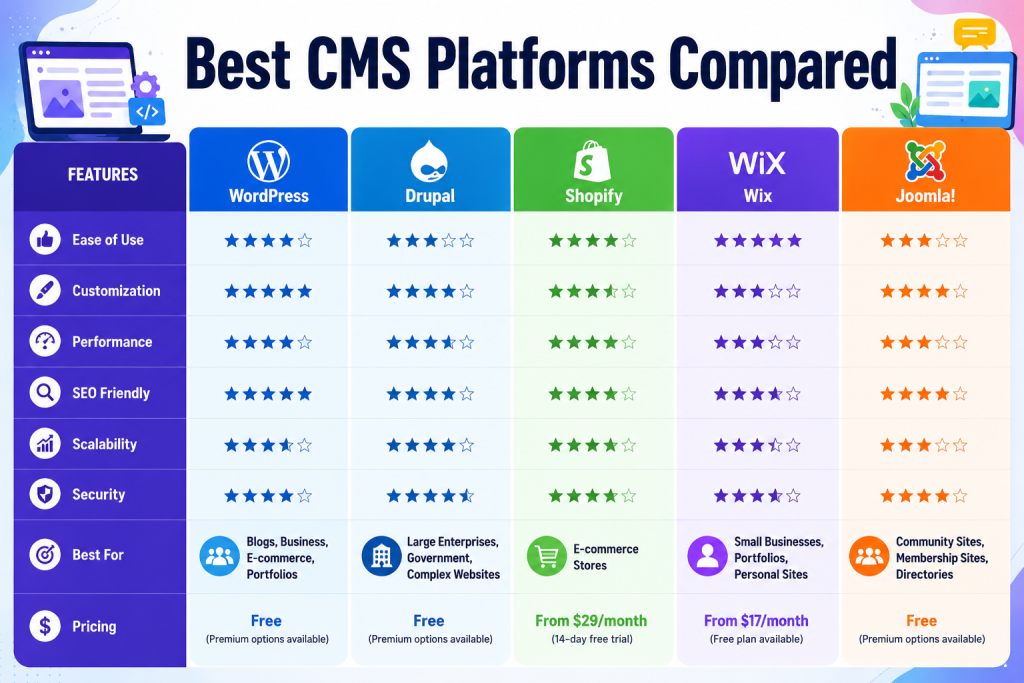
Best CMS Platforms Compared
Introduction Picking a content management system feels simple until you actually have to do it. Type “best CMS” into Google and you’ll get a dozen “top 10” lists that all say roughly the same thing, recommend the same three platforms, and leave you no closer to a decision that fits your actual business. This guide is different. We’ve spent years building, migrating, and troubleshooting websites on WordPress, Shopify, Webflow, Drupal, Joomla, and a dozen other platforms — for bloggers, ecommerce brands, agencies, and enterprises. What follows is the comparison we wish existed when we started: honest, specific, and built around real decision criteria instead of affiliate incentives. A content management system is the software layer that lets you create, edit, organize, and publish content without touching raw code every time you want to change a headline. But that simple job description hides an enormous amount of complexity, because your CMS choice quietly shapes almost everything else about your website’s future. Get the choice right, and your CMS becomes invisible infrastructure that just works. Get it wrong, and you’ll be migrating again in eighteen months — losing rankings, breaking links, and re-training your team in the process. Who This Guide Is For Bloggers and solo creators who want an SEO-friendly platform without a developer on call Small business owners comparing ease of use against long-term flexibility Ecommerce brands weighing Shopify against WooCommerce, Magento, or headless commerce Marketing teams and agencies managing multiple client sites at scale Developers and technical leads evaluating headless and composable architectures Enterprises that need security, governance, and multi-site management What You’ll Learn By the end of this guide, you’ll understand the different types of CMS architecture, the features that actually matter (versus the ones that just look good in a sales demo), detailed reviews of fifteen leading platforms, side-by-side comparison tables, SEO-specific rankings, security and performance benchmarks, a migration framework, and answers to the questions people ask most often before switching platforms. Expert Insight The “best” CMS is not a fixed answer — it’s a function of your team’s technical skill, your content model’s complexity, your growth trajectory, and your budget. Treat every ranking in this article as a starting point for your own shortlist, not a final verdict. What Is a Content Management System (CMS)? A content management system is software that separates the content of a website — text, images, video, product data — from the code and design that display it. Instead of hand-editing HTML files on a server, you log into a dashboard, write or upload content, and the CMS renders it on your site using templates. How a CMS Works Under the hood, most CMS platforms follow the same basic pattern: Content storage: Your text, media, and structured data live in a database or content repository. Content editor: A visual or block-based interface lets you create and format content without code. Templates and themes: Design rules define how that content is displayed on the front end. Publishing workflow: Draft, review, schedule, and publish states control when content goes live. Delivery layer: The CMS (or a separate front end, in headless setups) renders pages for visitors and search engines. Key Components of a CMS Content repository — where posts, pages, and media are stored Admin dashboard — the interface editors and admins use daily User roles and permissions — controlling who can create, edit, or publish Themes/templates — controlling layout and visual design Plugins/extensions/apps — adding functionality like forms, SEO tools, or ecommerce APIs — allowing the CMS to talk to other systems and, in headless setups, to any front end Types of CMS at a Glance We cover this in depth in the next section, but broadly: traditional CMS platforms bundle the back end and front end together (WordPress, Joomla, Drupal in default mode). Headless and decoupled CMS platforms separate content management from content presentation, giving developers freedom to build the front end in any framework. Benefits of Using a CMS No need to write code for every content update Faster publishing workflows for marketing and editorial teams Built-in SEO, media, and user-management tools A large ecosystem of themes, plugins, and integrations Easier collaboration across writers, editors, and developers Common Use Cases Blogs and content-driven media sites Ecommerce stores of every size Corporate and marketing websites SaaS product and documentation sites Membership sites and online courses Multi-brand or multi-language enterprise sites Image Suggestion A simple architecture diagram showing Content → CMS Database → Templates → Rendered Website, with a branching path for headless CMS showing Content API → Multiple Front Ends (web, mobile app, IoT). Alt text: “Diagram comparing traditional CMS architecture to headless CMS architecture.” Why Choosing the Right CMS Matters The CMS you pick isn’t a one-time decision — it’s an ongoing relationship that affects nearly every part of running a website. Here’s how. SEO Some platforms make technical SEO effortless: clean URLs, editable meta tags, automatic sitemaps, and schema support out of the box. Others require plugins, custom code, or workarounds to achieve the same basic hygiene. Since organic search is often the largest traffic channel for a website, this is rarely a minor consideration. Website Speed Page speed influences both rankings and conversions. Platforms differ enormously in how much bloat they add by default, how well they support caching and CDNs, and how much control you have over what loads on each page. Security Self-hosted, open-source platforms put patching and hardening in your hands, which means more control but also more responsibility. Fully managed SaaS platforms handle security centrally but limit your ability to customize server-level behavior. Maintenance and Total Cost of Ownership License or subscription fees are only part of the cost. Factor in hosting, premium themes and plugins, developer time, security monitoring, and the cost of eventually migrating away if the platform stops fitting your needs. User Experience for Editors and Visitors A CMS with a clunky editor slows down your content team every single day. A CMS that renders slow, cluttered